
Very often the question arises of how Dynamics NAV can be used in different languages, whether by foreign employees or by customers who speak a foreign language.
Today we would like to show you how multilingualism is ensured in Dynamics NAV 2018 and how an internationally usable system is provided.
Multiple languages in evidence & master data
In Dynamics NAV 2018, you can set up foreign language descriptions for your items without having to go through a lengthy process and print reports in multiple languages. For example, you can create invoices for your customers in the recipient's language. It is possible to assign language codes to individual debtors, which can be very helpful especially for foreign customers.
Similarly, it can also be useful to adapt article descriptions for domestic customers. These alternative descriptions are automatically selected. To be able to use multiple languages in documents, the texts for the alternative language must be inserted into the corresponding application objects.
Multilingual clients – changes in real time
It is possible to switch the language on the client in real time – provided that the language is available in the application. The language module can be used to implement multilingual functionality. However, it is important to note that the user can only use this function if the personal license file contains the appropriate language package.
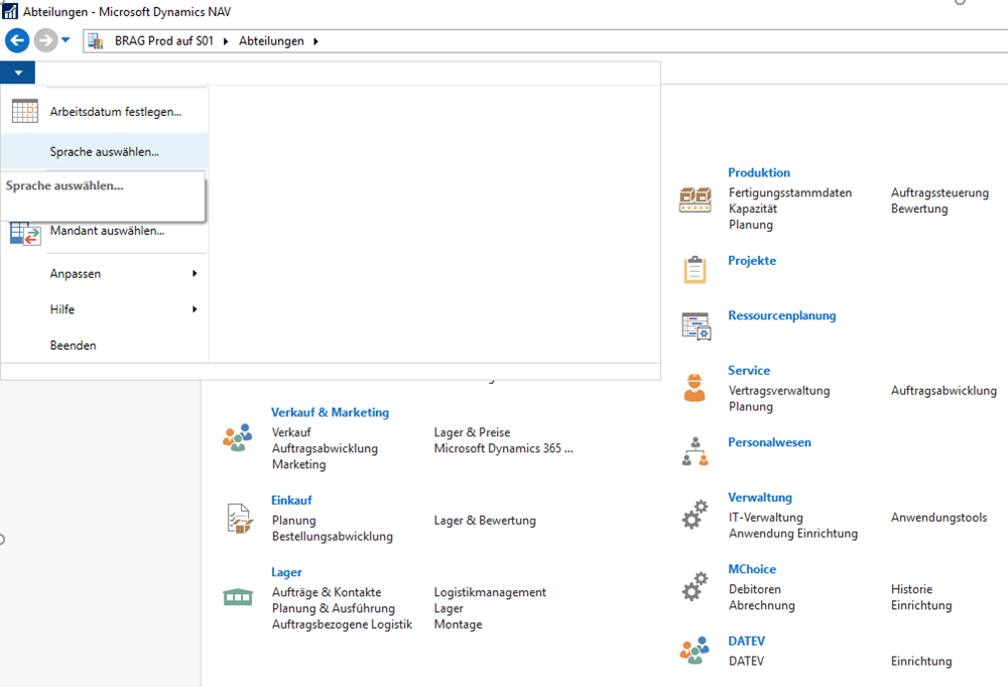
Switching between two languages is quite simple: In NAV 2018, there is a blue button with an arrow in the top left. This tab contains the function „Select language“. With this, a window opens where you can set the desired language. After confirming this, Dynamics NAV 2018 starts up automatically again.
Several functionalities in different countries
After selecting another language, the functionality of Dynamics NAV 2018 does not change. This means that English-speaking employees of a German company can use the German version and thus also the local functionality of Dynamics NAV 2018. As described above, only the language in the client is changed; the functionality of the respective version remains the same.
Examples of local functionalities can usually be found in the individual country versions in the area of taxation. Local functionalities of the German version include, for example, the electronic transmission of VAT declarations, the export of data in accordance with GDPdU or the function of regulating exchange rates. These – like other functionalities in other countries – are usually dependent on the respective legal framework. With their NAV system, you remain up to date, as significant country-specific changes are taken into account through the release of corresponding hotfixes.
If you would like more information about languages or other areas within Dynamics NAV, we are happy to advise you by phone at +49 (89) 21 111 848 or contact us by email at vertrieb@br-ag.com.