In Microsoft Dynamics NAV, you can define the necessary business processes. Access rights to tables now automatically recorded can be used. Whereas in previous versions, access rights had to be assigned manually step by step and usually according to the trial-and-error principle, it is now easier than ever to create authorizations for a specific process, such as the creation of sales orders, and then assign them to the corresponding users.
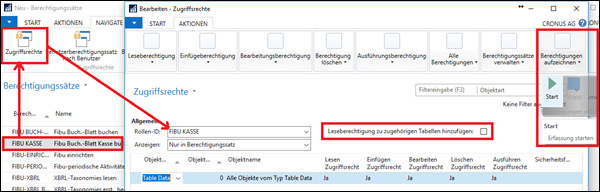
First, you create a new authorization record, start recording the authorizations by clicking the "Start" button and then execute all processes in NAV that the user should be able to carry out themselves later. Examples of this are the creation of a new customer, sales order or article master. The recording is ended via the "Stop button". NAV automatically creates all the necessary user rights for the previously performed activities via the system. Of course, additional required user rights can also be assigned manually at a later date or unnecessary user rights can be eliminated. If you also check the "Add read authorization to associated tables" box, the authorization set is extended to include the read authorization for the indirectly required tables.
If you would like more information on the subject of access authorizations, please contact us on +49 89 21111 848 or by e-mail at vertrieb@br-ag.com.